
Identity (ID) Theft
What is ID Theft (ID Fraud)?
A criminal steals your identity, creates accounts in your name (bank or credit cards) and uses them to run up bills, takes out loans or services but leaves you to foot the bill. It can be as simple as going through your rubbish bags, finding your old letters and bank statements and then applying for financial products using your details.
They often get additional personal information from insecure social media (Facebook, Twitter etc).
Should you be worried about ID Fraud?
It’s a nightmare to sort out, and can leave you out of pocket. ID theft can also lead to unpleasant encounters with debt collectors, court actions and problems getting a mortgage. It’s usually stressful as well as time-consuming.
However, while it is important to be concerned, taking sensible precautions should make you safe. And, crucially, as long as you can demonstrate that you have taken precautions and not been careless or negligent and divulged or allowed access to sensitive information, such as your PIN, there is a good prospect of getting your money back – eventually. What is sensible? Not using a PIN that is easy to guess (0000, 1234, birthday), having good antivirus and a strong password.
- Keep your PIN safe
- Buy a cross cut shredder (£20)
- Be secure online (see our articles on online scams and online security: see also phone fraud)
- Lock your smartphone (remember your smartphone is a computer that can make phone calls. Financial transactions and private information are potentially more at risk because you are probably less aware of the risks on your phone than on your computer)
- Regularly check your bank statements (easy to do if you bank online)
- Use a credit reference agency to regularly (at least once a year) check your reference files. Do it immediately if you suspect a fraud.
For more details go here. Find more about what it is, how to avoid it and what to do if you fall victim to this fraud.
Operation Jasmine
In Search of Accountability
A Review of the neglect of older people living in Care Homes investigated as Operation Jasmine
The BBC reported today:
“Families of care home residents in south Wales alleged to have been victims of abuse have welcomed the publication of a highly critical review of an investigation into the complaints and allegations.
Online Scams
Fortunately to Keep Safe online, you don’t have to become an expert in all the possible ways fraud might happen. This article will enable you to understand how and why you should take a few simple precautions.
You do however need to understand that the biggest risk for fraud on your computer comes from either:
unwanted software that has gained access to the computer
or
using a PC without adequate understanding or being careless when using it.
Criminals no longer have to break into your property to steal your valuables, because whether from the former Soviet bloc, West Africa or the Philippines, they can gain access through your computer.
The range of online scams is so large that it is totally impossible to cover all the types of scam that have been discovered. All we can do here is give you a flavour of some in the hope that it will alert you and enable you to spot others. Internet scams cost UK holidaymakers £2.2m last year. In the last 6 months of 2014, free trial scams cost RBS customers £2.9 million. Here is an article that will give you a good flavour of how wide-ranging scams are.
Phishing: This is a term that relates to email fraud. It gets its name from the fact that it is aimed at a large number of addresses. They don’t know you personally. Only a small number of recipients need to be duped by the email for them to be successful. The email is intended to look like an authentic message from a well-known company, most often a bank or email service provider. They will claim a problem with your account which you need to verify or your account will be closed unless you login in the next 48 hours. Fortunately, many are not very authentic and obvious key details are missing (like your name).
See also “Links and Downloads” below.
Online Payments: The main threats are from making payments over unsecured web pages and via
emails directing you to fake websites that are set up to collect your payment card details.
Online Shopping: The article from getsafeonline explains the risks and how to shop online safely.
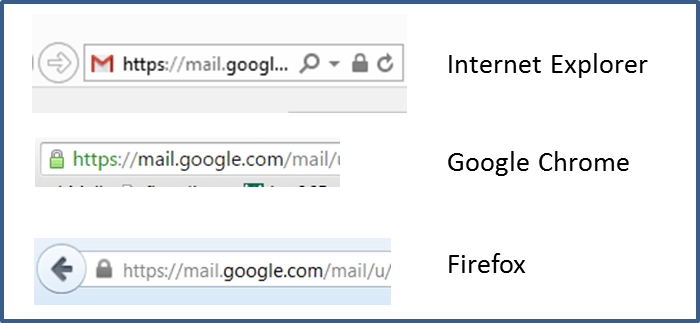
Copied 08/07/2015
Secure communications across the internet, particularly where financial transactions are involved, must have
the ‘https’ prefix (note the ‘S’) to a secure web address as well as the lock symbol.
Note how different the security features can be on different browsers. How my secure gmail account appears in 3 browsers.
Credit Card Guarantee (Section 75 rights): For items costing over £100, the credit card company are jointly liable with the retailer. So, if you have problems with your purchase you can go straight to the card company for redress. BUT – many companies now offer payment by credit card but via PayPal. You will lose your Section 75 rights if you do this.
You can read more about how to protect yourself against online scams and the clues to spotting fake websites here.
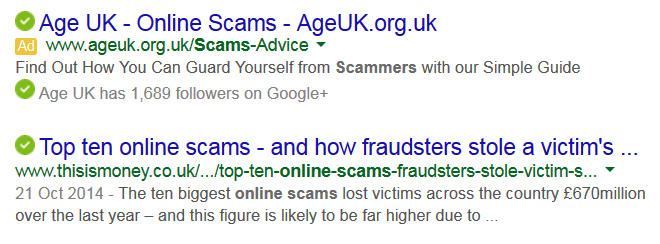
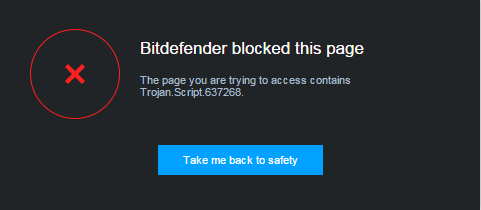
Avoiding Rogue Websites: A good antivirus suite will alert you if you are trying to access a rogue website. It will also give you reassurance, if you are doing a search, which sites carry no known risk.
Links and Attachments in Fraudulent Emails:
Clicking a link is a very convenient way to load a desired item. As an example we have created the links with both Text & a Logo which you would think would go to the Caerphilly Council Website, however, they do not go where you might think. If you hover your mouse over either of them, you should be able to see the actual address in the bottom left of your screen. As it happens these are quite safe; they will take you to getsafeonline. BUT it is easy to assume a link is safe. We suggest you always glance down to the bottom of the screen and check.

But check very carefully. Cybercriminals may also use web addresses that look very similar to that of well-known companies. Would you accept this address and click a link to it? www.micosoft.com
Attachments in emails should be viewed with equal caution. Never open an attachment unless you are very sure of the authenticity of the source.
Blue Badge Applications: Update
Blue Badge Update (from Office of the Older People’s Commissioner for Wales)
The new guidelines are stricter and are being interpreted differently by Local Authorities, it has been suggested that a postcode lottery now exists. Two Councils have decided to discard the Welsh Government guidelines and toolkit, and as a result fewer Blue Badge renewals are being rejected.
The key issue for older people is that there is no mobility component to older people’s entitlements such as Attendance Allowance, unlike entitlements for younger people such as Disability Living Allowance and Personal Independence Payments. Without this component, it is harder for older people to renew their Blue Badges, and the Commissioner is therefore concerned that the new guidelines are having a disproportionate effect on older people. Furthermore, although GP letters are no longer sufficient to support a renewal, some GPs are charging £50 for a letter. The guidelines were designed to prevent fraud and misuse of the system, but have now gone so far that people with genuine disabilities are having their Blue Badge renewals turned down.
A meeting was held with the Welsh Government’s Task and Finish Group in mid-June. The Group were very receptive to the Commissioner’s concerns, and we are now waiting for their recommendations to the Minister. The presentation to the Group included helpful case studies from Caerphilly 50+ Forum and from Flintshire and Pembrokeshire. Key points included the following:
- Since the introduction of Changes to the Eligibility Criteria (2013), Local Authority Verification Toolkit (July 2014), and Guidance to Local Authorities (January 2015), the nature of enquiries received by the Commissioner’s Casework Team has changed, with more older people asking for help following renewal rejections
- By moving towards a desktop assessment, it appears that fewer people who were previously eligible for a badge are now entitled (LAs reporting 46-50% refusal rate)
- With older people more likely to be disadvantaged and have to provide further evidence of need, there is an argument that the Scheme discriminates on the basis of age
- Older people say they’re not given clear information on precisely how they need to evidence their need and what information to provide
Case studies
- Mr F: tried to renew his badge but could not find an original copy of his entitlement to War Pension. Had other documentation to show he was in receipt but LA would only accept original
- Ms W: Unsure what medical evidence she needed to provide. Unable to provide GP letter: no longer accepted, no time. Some GPs however charging up to £50 for letters of support
- Local Advocacy provider concerned that a number of people with a genuine need were having their applications declined & no right of appeal once application was declined
- Mr S’ renewal was declined. Believed guidance was discriminatory as there were no mobility components to the entitlements he received. Under 65 with PIP different?
- Ms T’ renewal declined on medical grounds. Health issues not examined holistically, accumulative impact meant a BB was a necessity
Key issues
- Under Discretionary Criteria, older people’s entitlements (e.g. Attendance Allowance) do not have a mobility component to them (unlike PIP, DLA). Older people are more likely to be disadvantaged, discrimination on the grounds of age. An older person could have same condition as someone receiving higher rate of DLA (Automatic Criteria), but would not automatically qualify for the Blue Badge
- Lack of clarity on how to evidence need, what information to provide, and how to challenge/appeal decisions. Limit on number of appeals taken forward
- Lack of consistency: Local Authorities interpreting the Toolkit differently. Postcode lottery: stricter Local Authorities?
- Two Local Authorities are no longer using the Toolkit; some have introduced face-to-face assessments
- Toolkit at local level differs from that at appeals level? Individual rejected at local level eligible at appeals level
Windows 10 Free Upgrade
If you have Windows 7(SP1) or Windows 8.1 you should be able to upgrade to Windows 10 on July 29th or for up to one year after that date.
Pros
Let’s start the positives with a word from Microsoft
Windows 10 has been designed to operate seamlessly across all platforms, PC, Laptop, Tablets and phones; performance being optimised to touchscreens.
It comes with Cortana, Microsoft’s digital assistant. This is intended to provide faster access to important information, whether talking or typing. Internet Explorer is replaced with a new web browser, specifically designed for Windows 10; Microsoft Edge. The browser lets you annotate webpages by keyboard or pen before sharing them, while there’s also a distraction-free website reading view that simply gives you a site’s text and key images. The integration of digital assistant Cortana should make searching online and scheduling calendar appointments easier and faster too.
[If you want to find out what they are doing with Xbox and Microsoft HoloLens (what!), I refer you to your search engine!]
Cons
Major software launches usually means bugs to be sorted. Microsoft is offering free upgrades for a year after launch and so it might be wise to wait for 6months or so before upgrading. If you have Windows 8.1 and are happy with using it, I believe Microsoft have committed to support it until 2023. Of course, if you buy new hardware in the meantime, it is likely to come with a later OS.
Apparently Microsoft Office suite has been redesigned from the ground up to run on all Windows 10 platforms, while still retaining the familiar Office features. I have also seen suggestions that it will come free with Windows 10 but I have not seen anything definitive on that. If that is important to you, doubtless it will be clear once launched and you will know what you are getting if you delay your upgrade.
Why has Windows 8 only survived one update to 8.1? What happened to Windows 9? According to this article Windows 10 is no more than a rebranding of Windows 8, originally rumoured to be an upgrade to Windows 8.2. So, not all reviewers are overly enthusiastic about Windows 10.
How to Upgrade to Windows 10
Step 1: If you own Windows 7 or Windows 8.1 then you’re eligible for a free upgrade to Windows 10. However, in order to get Windows 10 you need to be running the latest version of your respective system.
To update your version of Windows over the internet, first open Windows Update by clicking the Start button. In the search box, type Update and then click Windows Update in the results.
In the left pane, click Check for updates and then wait while Windows looks for the latest updates for your computer. If any updates are found, click Install updates.
Step 2: Once your operating system is completely up-to-date you can reserve your free update for Windows 10 (if you want to upgrade as soon as it is available). Take a look at your system tray (in the lower right of your desktop) and you should see the Windows logo:  Click it to begin the reservation process and enter your email to receive a reminder once Windows 10 is available.
Note 1: My laptop, running Windows 8.1 acquired the system tray logo automatically. My PC running Windows 7, despite fulfilling all the criteria for being up to date refuses to get the logo. Apparently, it will be possible to test after launch if it is the specification of my computer that makes it ineligible.
Note 2: On January 13, 2015, Microsoft stopped mainstream support for Windows 7–which is still an extremely popular operating system. But you’ll still be able to use it safely for another five years. Once mainstream support ends, there will be no more service packs. Microsoft won’t redesign the environment or add new features. Microsoft will patch vulnerabilities that could become security risks; Windows 7 remains a safe operating system.